Category Archives: Featured

Some of my favorite posts from both work and life categories.

Door County Century Recount

One week after the Door County Century (nearly) and I’m finally getting around to writing about it. In short – it was a great ride, a wonderful cap-stone to the cycling season; but I’m jumping ahead.

The night before, Erik, Monica, LeRoy, Ena, Barbara and I had dinner of a lot of spaghetti and bread sticks and wine. Erik had picked up the latest weather report and it looked a bit sketchy: cool in the morning (54 F) with winds out of the West. We would ride into those winds then have them off of the bay and over our left shoulder for the next 40 miles. Then the winds would turn and come out of the south west (into our faces) and bring rain. It wasn’t supposed to get very warm either (62 F). Cold morning with wind off the bay, cold and raining afternoon with wind in our faces. Bleach.

The prognosticators were wrong and we had a beautiful day. We had gorgeous sun and perfect weather almost all day. But I’m jumping ahead again. We had a few miscues getting to the start but finally hit the road at 7:40AM – about 30 minutes later than we planned.

20532058206220662070

We met up with a group of riders (Bradely, Jim, Dean, et al) who were well matched with us. We switched off pulling with them and had a great ride through to the second rest stop. It was great fun pulling a line of 20 or so riders along the bay.
20742078208220862090209420982102

Barbara, Ena and our dog Lola met us at the second rest stop so we could drop cold weather gear for the rest of the ride. It was great of them to chase us around Door County. They were great sports and that made the ride a lot more fun. Lola knew how many riders were in our group and she would check until she found us all at each stop.
210621102114211821222138214221462150

By the last leg, it was often just the four of us pulling together. The weather was beautiful and the route was very nice. We all finished together as a group.
215421582162

It was a great ride on a beautiful day.

Here are all the photos and a link to my Garmin data from the ride if you really want to geek out.

2166

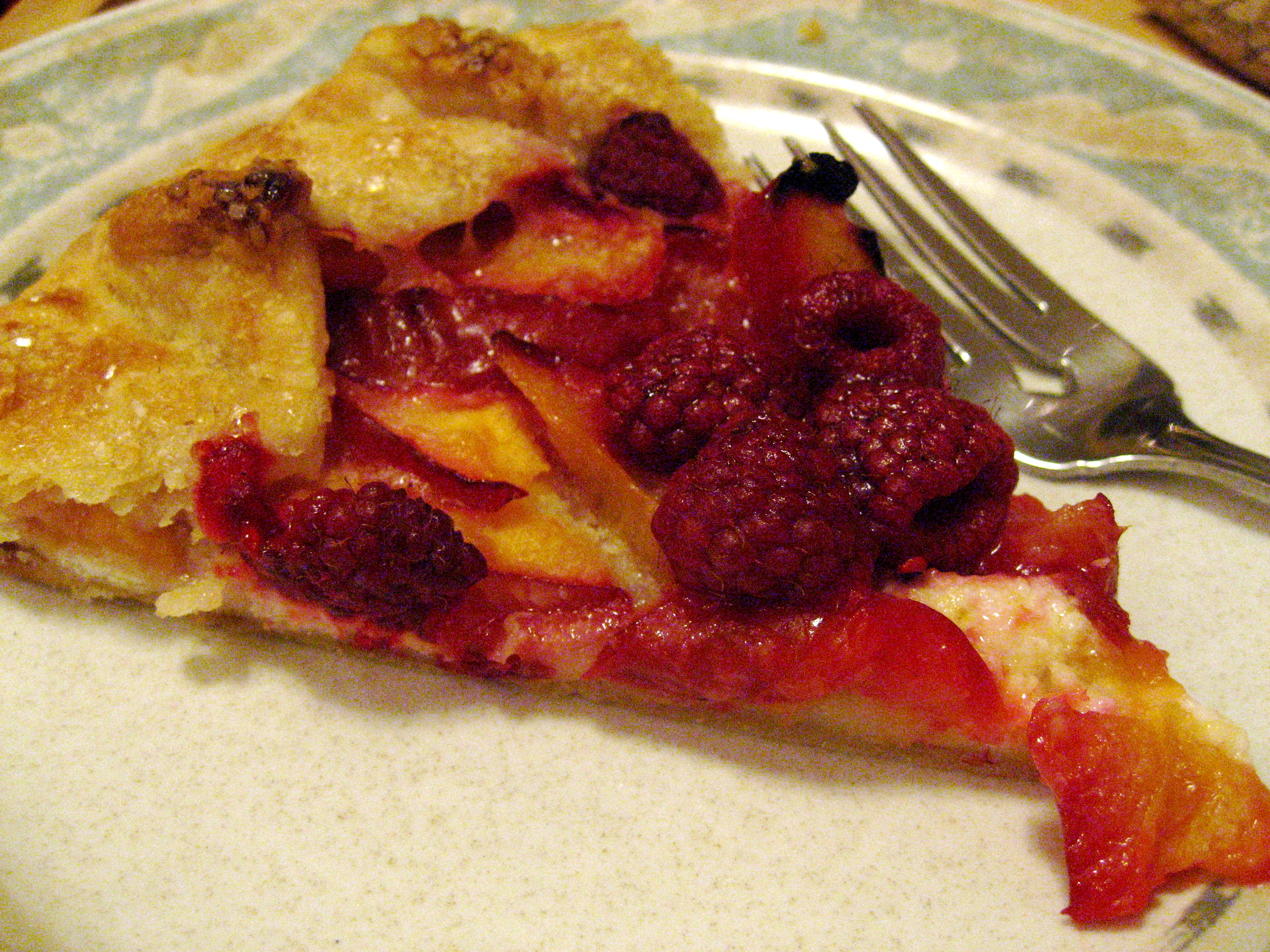
Plum and Raspberry Galette with Lemon Ricotta Filling

Plum Raspberry Galette

Plum Raspberry Galette

I love making galettes – a french free-form tart.  This is a peak of Summer galette made from local plums and raspberries.  Once you get galette making down, you can create galettes with lots of different fillings:  Apples and toasted pecans, peaches with almonds, blueberries with lemon.  This takes few hours to make but much of that time is waiting for the galette dough to chill or for the galette to bake. 

Preheat oven to 385 F

Ingredients:

1 pound Plums (firm ripe)
1 C fresh raspberries
8 oz. Ricotta
Zest of 1 Lemon
1 Egg at room temperature
1 Tbl cornstarch
2 Tbls (plus more for dusting) Powdered (Confectioners) Sugar
1 Tbl melted butter
3 Tbl Turbinado Sugar

1 disk Galette dough (see the recipe below).

Put the ricotta into a fine strainer or inside of a piece of cheese cloth and let it drain for 30 minutes or more.  Mix the lemon zest and 1 Tbl of confectioners sugar into the ricotta.  Taste the ricotta mixture.  It should be balanced between sweet and salt and taste lemony.  If it needs more sugar, add a bit more to bring the sweetness up.  Once it tastes like you want it to, mix the egg in well.

Lemon zestRocotta draining

Slice the plums into 1/4 inch wide slices.  To pit a plum, slice all the way around the outside of the plum from the top to the bottom.  Slide your knife into the plum at the top then turn the plum over cutting the plum in half all the way to the pit.  Follow the seam along the outside of the plum where the two halves of the plum grow together.  Then twist the two halves apart, back and forth, gently until one side breaks free from the pit.  Slice this half into 1/4 wide slices.  Cut the other half the plum in half again.  Do the twist trick once more until one quarter of the plum breaks free of the pit.  Cut the pit out of the remaining quarter off of the pit or pull the pit out with your fingers. 

Add the slices to large bowl.  Add 1 Tbl cornstarch and the remaining 1 Tbl of confectioners sugar.  Add a pinch of salt and mix.  Taste your plums, if they are tart, you might want to add more confectioners sugar.

Plums

Roll out the galette dough into 16“ wide disk and trim to a circle.  Slide the dough onto a piece of parchment paper and then slide the parchment and dough onto a baking sheet.

Drop small pieces of the ricotta mixture into the center of the dough leaving a 2 inch margin around the outside edge of the dough.  Lay the plum slices on the ricotta.  If you making this for a fancy party, you can arrange the slices in concentric circles.  If you want quick and simple, just pile it all inside.  Make sure to leave a 2 inch margin of dough so that you can fold it over to make the pleated edge.

Assembling Galette

Fold the edges of the galette dough over the sides of the fruit.  There are several ways to pleat a galette dough.  See this Fine Cooking article for details.

Brush the dough with the melted butter.  Sprinkle the turbinado sugar over the buttered dough and across the top of the galette.
Assembling

Bake the galette for 30 minutes turning once after about 20 minutes.  Sprinkle the raspberries across the top of the galette and bake for 15 more minutes.  Pull the galette from the oven when the dough is nicely browned.  Slide the parchment paper and galette off onto a cooling rack and let cool for 10 minutes or more.  Dust the top of the galette with confectioners sugar and serve.  You can serve this with vanilla ice cream or creme fraiche (whisk lemon juice and confectioners sugar into the creme fraiche) .

Finished Galette

Galette Dough Recipe

5 3/4 oz. (1 1/4 cups) All-purpose Flour
1 Tbs. Sugar
1/4 tsp. Salt
4 oz. (8 Tbs.) well chilled unsalted butter cut into small cubes
1/3 cup Ice water

Add the dry ingredients to a food processor and pulse several times to mix.  Add the butter and pulse a few times.  Do not over mix the butter.  There should still be pea sized chunks of butter in the dough.  Do not mix until it looks like corn meal.  Add the water all at once and pulse a few times until the dough starts to come together.  It will not come together into a ball.  It will still be crumbly and will seem under mixed but don’t worry it will come together in the fridge.  Pour the dough onto a sheet of plastic wrap.  Gather it up and form it into a disk.  Wrap tightly and put in the fridge for two hours. 

Technorati Tags: ,

Tired, Grumpy, Fuzzy and Twitchy

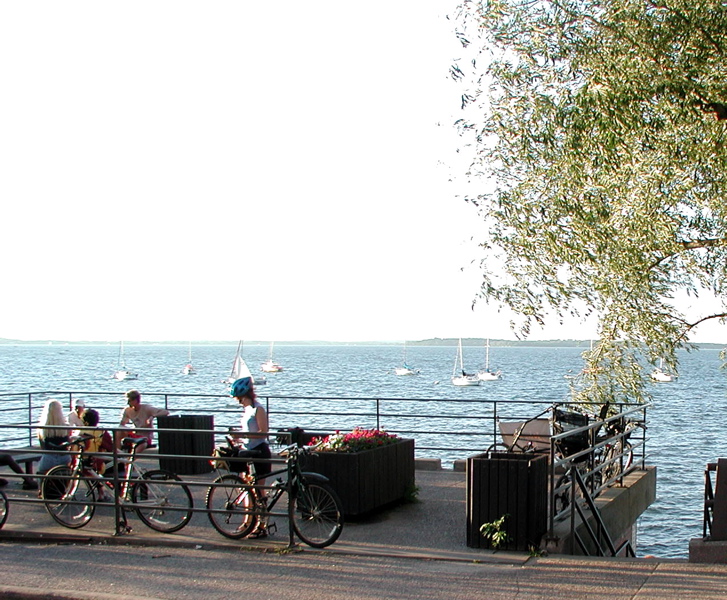
Lake Mendota, bikes and boats

Lake Mendota, bikes and boats

I’m sure that sport psychologists / physiologists have a name and maybe a reason for these feelings…
I’m getting ready to ride the Door County Century this weekend. This means that I have spent the last couple of months riding longer rides and building up time in the saddle. I was up to about 190 to 200 miles a week two weeks ago. I was also working out with a personal trainer twice a week. In short, I was getting a lot of exercise – 15 plus hours a week.
As this weekend approached and the up-coming century ride, I started to taper off my workouts. I dropped my twice-a-week personal trainer moving down to once a week last week and none-a-week this week. I’ve backed off the miles that I bike each week.
I’ve noticed that, as I taper back on my workouts, I get twitchy and anxious feeling but it is mixed with fuzziness and sleepiness. I’m also kinda grumpy which (I think) is unusual for me. It is an unwholesome combination of lack of mental focus mixed with an over-caffeinated kind of buzz and a lethargic desire to nap for hours on end. I’m a bit concerned about the end of the biking season which coming up soon due to lack of light, too much cold and then snow. I’ll need to ski a lot this Winter and find another indoor endurance exercise (swimming?) for those long Winter months.
On the other hand, the rest has felt good. My shoulders, neck and hamstrings were starting to complain about all the work they were doing. But then again, all this exercise has meant that I could eat well and still drop weight.

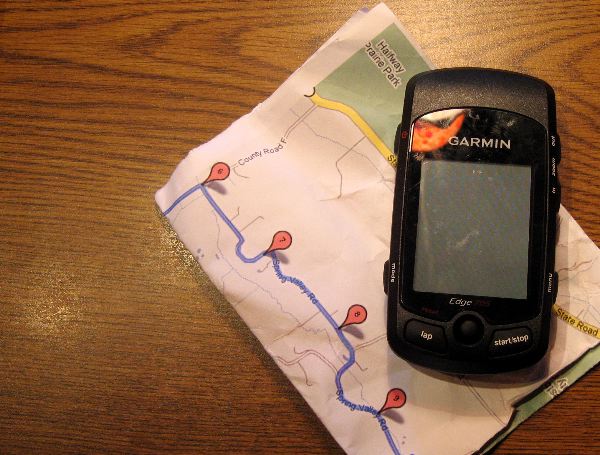
Garmin EDGE 705 – Bugs, Bells and Whistles

I got a new Garmin EDGE 705 bike computer about 6 weeks ago. I’ve been riding 3 or 4 times a week with Garmin and have synced to several applications and a web site. The Garmin EDGE 705 has great bells and whistles but the basic function, turn-by-turn directions, is buggy and unreliable.

What I bought: I bought the Garmin Edge 705, with the Heart Rate sensor, Speed/Cadence sensor & Data Card with Street Maps (SKU 010-00555-40). It came with version 2.2.0 of the firmware. I have also tried version 2.3.0 and 2.4.0.

What I like:

Installation: I love the fact that there is a single sensor that picks up both speed and cadence. The sensor is also sensitive so you don’t have to set it extremely close to the pedal or wheel for the device to work. The Garmin EDGE 705 discovers the peripherals automatically and flawlessly (at least for me. Others on the forum have talked about cadence problems).

Set Up: There are a lot of menus to cycle through to set up the device. This is a mixed vote from me. I like the ability to set up how each screen looks (how many data fields are show, what information is displayed in each data field, etc.). I have had to dig to find settings and I know that someplace I set the minimum speed for autopause. I have yet to figure out where I set that so I can change it.

Post Ride Data Analysis: This is where the bells and whistles ring out. The device syncs brilliantly and easily (for me, YMMV, see the Motion Based Forums) to the Garmin software on my Mac. It also syncs to the MotionBased web site (see the list of my rides in the sidebar on this site). I also bought Ascent from Montebello Software. The default Garmin software provides basic analysis of your ride data. MotionBased and Ascent provide detailed analysis some of which is pretty cool.

What I don’t like:

Turn-By-Turn Navigation: Supposedly, you can load a GPS Track File (in GPX format) into the Garmin. You then tell the Garmin that you want to follow that track. The Garmin will navigate you around the route. Supposedly. I have tried to get this to work a half dozen times. I have created GPX Track files in GMap-Pedometer, Google Maps and MapMyRide.com. I have tried making sure that the start and end points aren’t near each other.

This has never worked correctly. I’ve had the device start to tell me to make u-turns in the middle of my ride. I’ve had the unit tell me to make a turn 5 miles early, then shut off. I’ve had the unit say that I should cut through a barn and corn field though I preferred to stay on the road.

I do have hopes that Garmin will patch the software so turn-by-turn works. Garmin does seem to be responsive to their users and they do seem to issue patches regularly.

Managing the Buttons: You need to push and hold the power button to on the Garmin. You need to push the timer start at the beginning of the ride. You must push timer stop at the end of the ride or the Garmin will keep recording even though your wheel isn’t turning. The Garmin added the drive back from one ride to my total ride. I could hear it chirping away as I drove home. Compare that to my simple CatEye computer that just starts and stops on its own or my Polar that I needed to push start but it could figure out the ride was over all by itself. It feels like I need to pay more attention to managing my cycle computer than I really want to.

Software Updates, Syncing et al: All of this works flawlessly (so far) but it is another device that gets software updates and that you need to sync to your computer. It is fine but just another digital device to fuss with.

Conclusion:

The set-up is easy. The unit will automatically calibrate for wheel size and speed. The post ride data analysis is great. It makes it dead simple to keep a work-out log. The turn-by-turn doesn’t work so I still ride with a paper map to navigate by. I would love to be able to rely on this device for navigation when I’m riding. It is fussier than other computers that I have used but the post-ride data analysis is a beautiful thing.

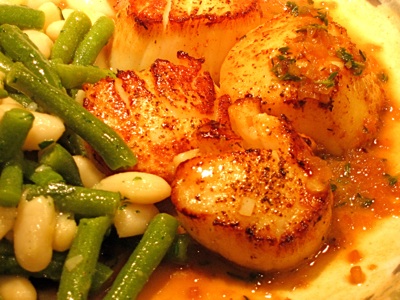
Jim’s Fire and Wine Scallops Recipe

Scallops with Green and White Bean salad

Scallops with Green and White Bean salad

The sauce and spice mix add a little heat and sweetness to the already sweet scallops. This recipe takes about 15 minutes to prep and 10 minutes to cook. I served these with a cold Green and White bean salad and crostini and an Italian white wine. This serves two as a main course or four as an appetizer.

Ingredients:

  • 1/4 C minced sweet onion (Walla Walla or similar)
  • 1 Tsp. Fresh Thyme leaves or chopped Thyme tips
  • 1 clove of garlic peeled
  • 1/2 C. White Wine – medium dry
  • 12 Oz of large dry scallops or the closest even number (8 in this dish)
  • 1 Tbl each Olive Oil and Butter
  • Penzey’s Northwoods Fire spice mix or the mix below
  • Salt and Pepper to taste

Instructions:

Mince the onion and either pick the thyme leaves or chop the thyme tips. Lightly dust the scallops with the Penzey’s Northwoods Fire mix or lightly dust with chili powder, smoked paprika, dried thyme, salt and pepper. Heat a 12″ non-stick pan over medium high heat. Add olive oil and butter and heat until butter stops foaming and turns lightly brown.

Onion and Thyme
Dusted ScallopsOlive Oil and Buttr

Add the scallops and the whole garlic clove to the pan but do not crowd the pan. Let the scallops sear on one side for 3 minutes. Turn the scallops and add the thyme and onion. Stir the thyme and onion into the oil. Let the scallops sear for 2 to 3 more minutes then remove to a warm plate.
Add Scallops and GarlicTurn add onions

Add the white wine and turn the heat up to high. Scrape all the brown bits off the pan and stir while you reduce the wine by half

Add wine.

Plate the scallops. Taste the sauce and adjust the seasoning with salt and pepper if needed. Pour the sauce over the scallops.

Frazz Hair

I get Frazz Hair when I bike. I view Frazz Hair as a measure of the quality of the ride. Good Frazz Hair means I had a good ride. This is an example of good Frazz Hair:
Frazz Hair

This hair came from a beautiful ride to Paoli, WI after a Summer rain storm. The roads were dry but it smelled like a Summer rain and wheat fields and the herbaceous scent of prairie flowers in bloom.

We were riding fast – that helps pull hair up into the vents on my helmet and make it all spiky. We were working hard so there was plenty of heat and moisture to steam-set those spikes. It was a long enough ride to give the Frazz Hair plenty of time form and build to the beautiful example you see above.

It’s a good day that ends with really good Frazz Hair.

Spring in Wisconsin – weather runs amok

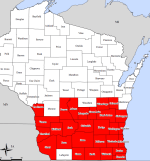
UPDATE: June 25th. We now have 28 counties declared as disaster areas by FEMA.

Wisconsin Disaster Area Map

When we get serious Spring weather, we get weather sites that look like this:

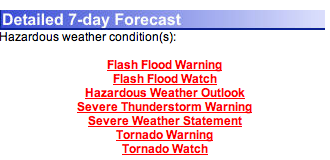
  • 7 Warnings, Watches and Statements on the Weather.gov forecast
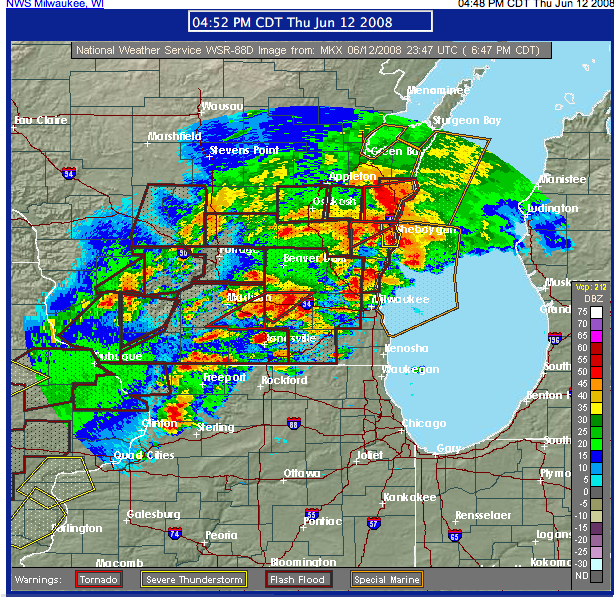
  • A weather map that is covered, jigsaw like, with areas of watches and warnings across the surrounding 25 counties. Nary a gap between the warnings and
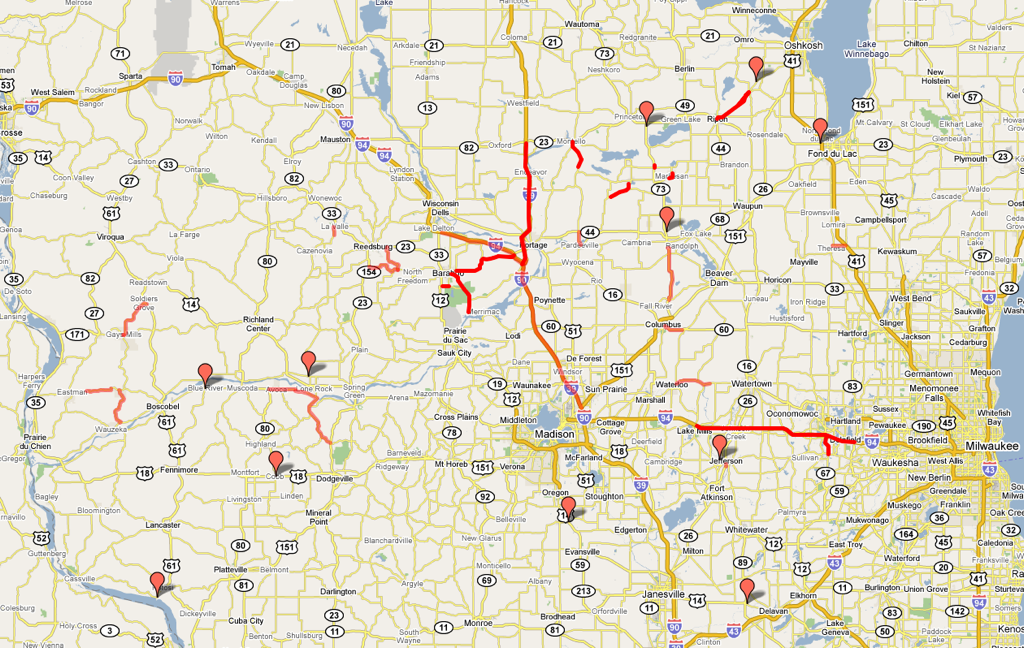
  • A Wisconsin DOT incident alert map with 38 road closures due to flooding the next day.


We had 7 tornado warnings in town Thursday. I spent a lot of time checking the weather on WKOW. Two tornados went past south of our house about 20 miles.

Digital Neighborhoods – Guiding design

Second LifeDigital neighborhoods seem like a powerful tool for discussing technology and its impact on users (students, staff, researchers, etc) and the concept adds interesting new requirements to projects. Getting a good understanding of your users’ digital neighborhoods can guide design and deployment of new technologies and help predict impacts on the users themselves. Understanding how they move in their neighborhood, where they travel frequently and what places are stable over time, provides insight into the key places you should try to place application.
I came upon Jeff Swain via Twitter which led me to his blog-post about his digital neighborhood. I was wandering in my digital neighborhood and into the surrounding areas when I found his link. Jeff talks about reading David Weinberger’s Small Pieces Loosely Joined. To quote Jeff’s post:

As Weinberger points out space on the web doesn’t work that way. Distance is measured in hyperlinks and proximity is created by interest. In other words, each of us gets to create own own space on the web. Your own neighborhood, if you will, filled with the places you find interesting…. So this got me to thinking, What does my digital neighborhood look like? What seemingly disparate places are loosely joined (pun intended) just because I happen to be interested in them?

Jeff then goes on to do an analysis of his digital neighborhood.

As I read Jeff’s piece, I began to think about the value of understanding digital neighborhoods. If we understood our incoming students’ digital neighborhoods, it would give us a better understanding of how to reach them, what their interests are and places that we should think about pushing content into. One example that we have in place is in Facebook. We now have an emergency notification group and system in place in Facebook. Our leadership can push out notices via Facebook, into the user’s neighborhood.

Another example is our increasing use of RSS feeds for various applications and calendar feeds. This lets users pick up the content and move it to their own neighborhood. I have a calendar feed for our corporate calendar system integrated into my Google homepage. I can check my work calendar while checking personal email, local news and recording my workouts. The fact that my calendar appears among my personal tools means I track changes to my calendar much more closely when I’m at home doing my personal things. In some ways, Google’s custom homepage is like strip-mall with a few anchor stores (Mail, Calendar, Google Apps) and a lot of empty store fronts that you can fill with your own shops.

The value of these virtual malls, is that users can aggregate enough of their own personal content and applications that it makes it worth the trip. Every time you go on the web, you have thousands of possible places you could visit. Yet, you visit a select few. If we continue with the physical store/neighborhood metaphor: Every time you go shopping, you could go to any store in town but you go to a select neighborhood (like our State Street) because of the variety of interesting shops or to a given store because of the shop has some unique value (low price, selection, the one thing you can only find at their store). A similar thing happens when we deploy applications. Users are expected to visit that application because of the unique value it brings. When we bring up applications that are separated from their current digital neighborhood, it is like building your store in a new mall well out of town. The users have to have some reason to visit. The value has to be higher than an application built in their neighborhood or built such that it can easily be included.

This suggests to me at least, that we need to think about our users’ current digital neighborhoods and how we can integrate our new applications and services into those neighborhoods. RSS feeds are a low risk and fairly simple way to move content into their neighborhoods. Facebook groups and applications could reach into the students’ world. Portlet type applications that can be put into existing enterprise portals or into sites like Google’s homepage allow richer interaction. Finally, if if has to stand on its own, it better have unique value that makes it worth the trip.

Technorati Tags: , , , , ,

Eat your vegis or Have A Little Green Tree – getting EA into the Enterprise

I was thinking about how, when I try to get buy-in for doing Enterprise Architecture as a holistic thing, I tend not get very far with the campus. But, when I parse out little EA bits, they catch on. I was thinking about this in terms of the metaphor: Getting Kids To Eat Vegetables. Before I go on further – this is not meant to demean the campus community nor do I mean to imply they are childish. It is just a good metaphor for my understanding what is going on around me.

There are two approaches to getting kids to eat vegetables. The first is the top-down, holistic approach where you explain that vegis are good for you. You talk about good food and bad food and vitamins and healthy eating. This is the Enterprise Architecture as a holistic practice approach. You talk about why we need to do Enterprise Architecture and the benefits or reducing redundancy, getting a handle on what we are doing and why, setting a clear(er) roadmap for the future. Our institution, like most kids, don’t really get the point of the discussion nor do they buy into the argument.

The second approach (re: kids and vegis) is to sell them on “eating a little green tree” also known as broccoli. Then convincing them that peas with mint are pretty good cold. Once they are eating three or four types of vegis, you can explain the vegetable concepts and start in on nutrition. “You know, carrots make it so you can see better in the dark. That’s pretty cool that a carrot can give you night vision. Let’s eat carrots each night this week and see if on Saturday, we can see better in the dark.” You can get buy-in for the short-term cool gain of one vegetable type.

This is what seems to be working for us architects here at UW-Madison. I have slowly started pushing out some different artifacts and practices. Each one is catching on based on its own merits. We have various places starting with principles using the TOGAF format for Principles .

I’ve started to get people interesting in applying the NIH EA Brick Diagram to various projects and technologies.

This is an interesting approach to “doing enterprise architecture”. I’ll need to focus more on small acceptable bites that are examples of why you should do EA at large. Get them eating broccoli, peas and carrots and then talk about nutrition.

Technorati Tags: , , , , , , ,

EA in Academia Presentation

Below is a repackaged copy of my “Enterprise Architecture in Academic Environments” presentation that I gave at EDUCAUSE Mid-West Regional Conference 2008. It is packaged as a Quicktime Movie.